HCIA-三层无线组网
标签
HCIA-Datacom
字数
850 字
阅读时间
5 分钟
拓扑图
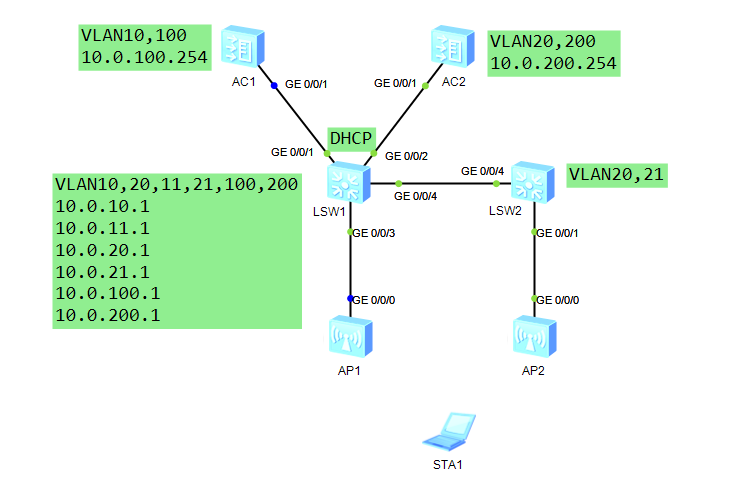
配置说明
AP管理VLAN:VLAN10、20 STA业务VLAN:VLAN11、21 DHCP服务器:S1作为DHCP服务器为AP分配IP地址;S1作为DHCP服务器为STA分配IP地址 AP的IP地址池:10.0.10.0/24、10.0.20.0/24 STA的IP地址池:10.0.11.0/24、10.0.21.0/24 AC的源接口IP地址:VLANIF100(10.0.100.254)、VLANIF200(10.0.200.254) AP组名称:ap-group1、ap-group2 引用模板:VAP模板depart1、depart2 域管理模板名称:default 国家码:中国(CN) SSID模板名称:depart1、depart2 SSID名称:huawei 安全模板名称:depart1、depart2 安全策略:WPA-WPA2+PSK+AES 密码:huawei123 VAP模板名称:depart1、depart2 转发模式:直接转发 业务VLAN:VLAN11、21
配置代码
三层无线组网简单配置说明
这里仅配置:AC1、LSW1以及将AP1加入ap-group1
AC配置
基础网络配置
vlan batch 100
int vlanif 100
	ip add 10.0.100.254 24
	quit
int g0/0/1
	port link-type trunk
	port trunk allow-pass vlan 100
	quit
配置AP组模板
wlan
	regulatory-domain-profile name default
		country-code cn
		quit
	ap-group name ap-group1
		regulatory-domain-profile default
静态导入AP
wlan
	ap auth-mode mac-auth
	ap-id 0 ap-mac 00e0-fc6a-68e0
		ap-name ap1
		ap-group ap-group1
配置capwap和静态路由
capwap source int vlanif 100
ip route-static 0.0.0.0 0 10.0.100.1
LSW1配置
基础网络配置
vlan batch 10 100
int vlanif 10
	ip add 10.0.10.1 24
	quit
int vlanif 100
	ip add 10.0.100.1 24
	quit
int g0/0/1
	port link-type trunk
	port trunk allow-pass vlan 100
	quit
int g0/0/3
	port link-type trunk
	port trunk allow-pass vlan 10 100
	port trunk pvid vlan 10
	quit
DHCP配置
dhcp enable
ip pool ap-group1
	gateway-list 10.0.10.1
	network 10.0.10.0 mask 255.255.255.0
	option 43 sub-option 3 ascii 10.0.100.254
	quit
int vlanif 10
	dhcp select global
	quit
配置成功之后在AC上能够看到AP上线消息 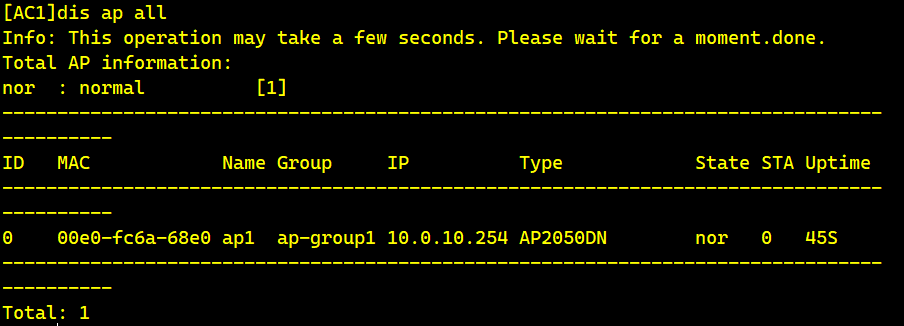
完整配置(除上述简单配置)
基础网络
LSW1
vlan batch 11 20 21 200
int vlanif 11
	ip add 10.0.11.1 24
	quit
int vlanif 20
	ip add 10.0.20.1 24
	quit
int vlanif 21
	ip add 10.0.21.1 24
	quit
int vlanif 200
	ip add 10.0.200.1 24
	quit
int g0/0/2
	port link-type trunk
	port trunk allow-pass vlan 200
	quit
int g0/0/4
	port link-type trunk
	port trunk allow-pass vlan 20 21
	quit
int g0/0/3
	port link-type trunk
	port trunk allow-pass vlan 11
	quit
LSW2
vlan batch 20 21
int g0/0/4
	port link-type trunk
	port trunk allow-pass vlan 20 21
	quit
int g0/0/1
	port link-type trunk
	port trunk allow-pass vlan 20 21
	port trunk pvid vlan 20
	quit
AC2
vlan batch 200
ip route-static 0.0.0.0 0 10.0.200.1
int vlanif 200
	ip add 10.0.200.254 24
	quit
int g0/0/1
	port link-type trunk
	port trunk allow-pass vlan 200
	quit
DHCP配置
在LSW1上进行DHCP服务器配置
ip pool ap-group2
	gateway-list 10.0.20.1
	network 10.0.20.0 mask 255.255.255.0
	option 43 sub-option 3 ascii 10.0.200.254
	quit
ip pool ap-sta1
	gateway-list 10.0.11.1
	network 10.0.11.0 mask 255.255.255.0
	quit
ip pool ap-sta2
	gateway-list 10.0.21.1
	network 10.0.21.0 mask 255.255.255.0
	quit
int vlanif 20
	dhcp select global
	quit
int vlanif 11
	dhcp select global
	quit
int vlanif 21
	dhcp select global
	quit
AP配置
配置AP组模板,并将AP加入对应AC(AC1已经配置完成,现在配置AC2)
capwap source int vlanif 200
wlan
regulatory-domain-profile name default
	country-code cn
	quit
ap-group name ap-group2
	regulatory-domain-profile default
静态导入AP
wlan
	ap auth-mode mac-auth
	ap-id 1 ap-mac 00e0-fcc0-0100
		ap-name ap2
		ap-group ap-group2
		y
		quit
	quit
在AC2上查看加入的AP 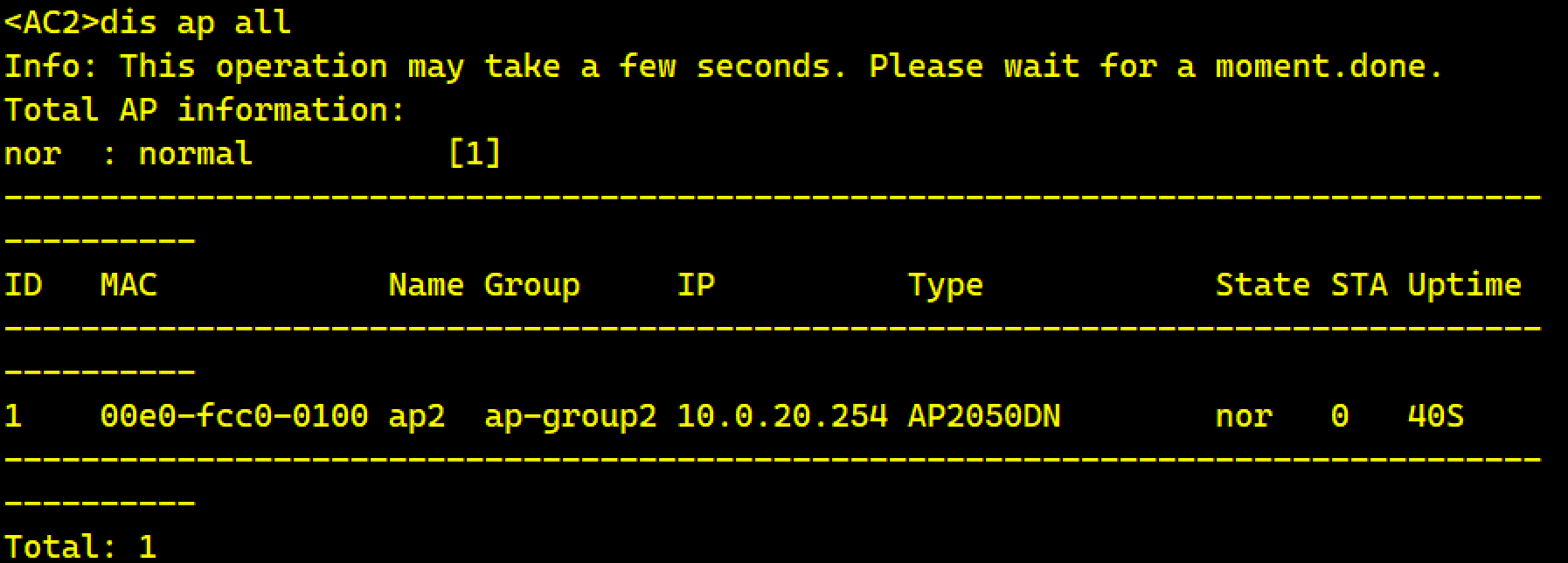
无线射频
LSW1配置
wlan
	security-profile name depart1
		security wpa-wpa2 psk pass-phrase huawei123 aes
		quit
	ssid-profile name depart1
		ssid huawei
		quit
	vap-profile name depart1
		wlan
	vap-profile name depart1
		forward-mode direct-forward
		service-vlan vlan-id 11
		security-profile depart1
		ssid-profile depart1
		quit
	ap-group name ap-group1
		vap-profile depart1 wlan 1 radio all
AP1的射频 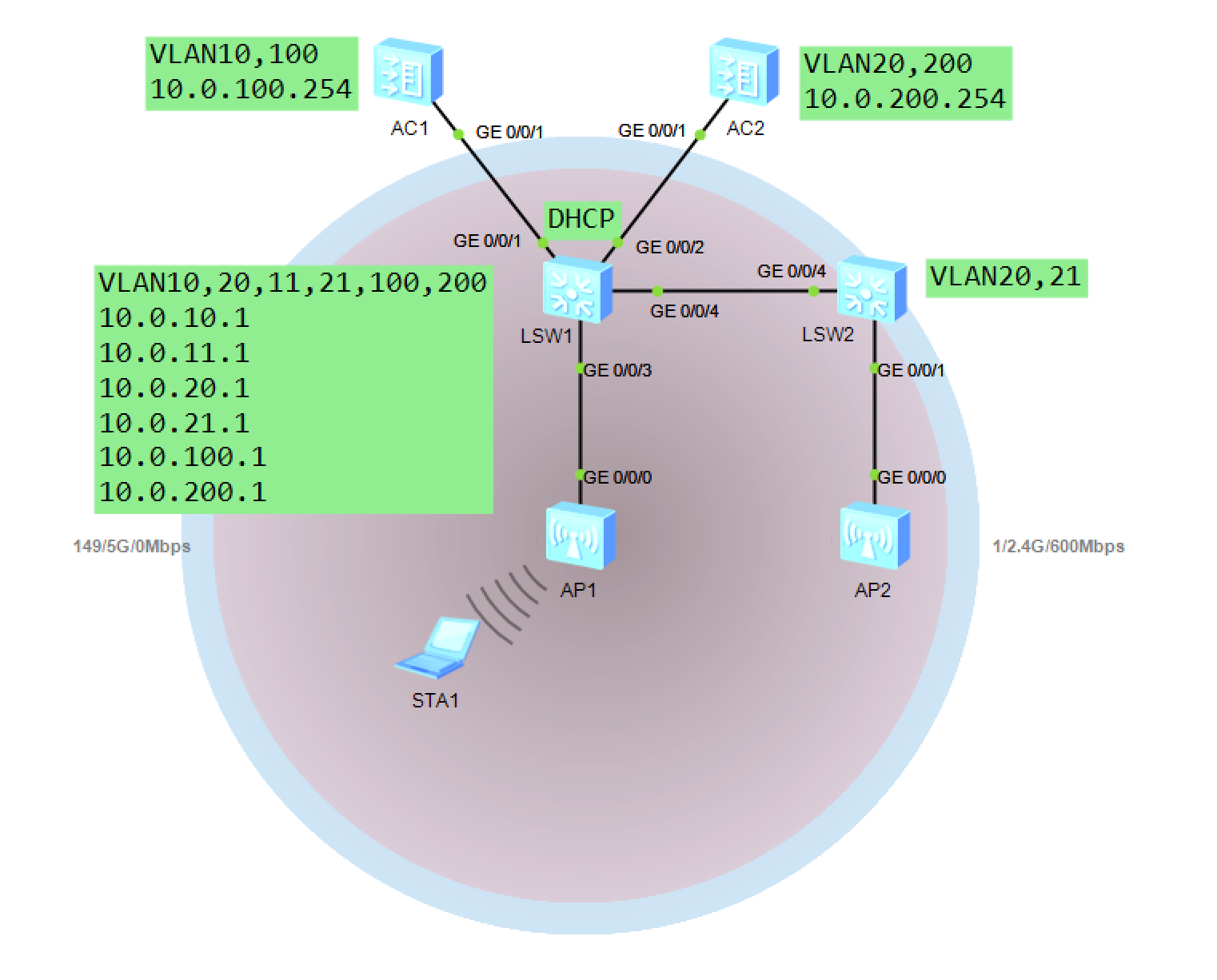 AC2的配置
wlan
	security-profile name depart2
		security wpa-wpa2 psk pass-phrase huawei123 aes
		quit
	ssid-profile name depart2
		ssid huawei
		quit
	vap-profile name depart2
		wlan
	vap-profile name depart2
		forward-mode direct-forward
		service-vlan vlan-id 21
		security-profile depart2
		ssid-profile depart2
		quit
	ap-group name ap-group2
		vap-profile depart2 wlan 1 radio all
现在AP1和AP2完成射频,现在需要配置三层漫游 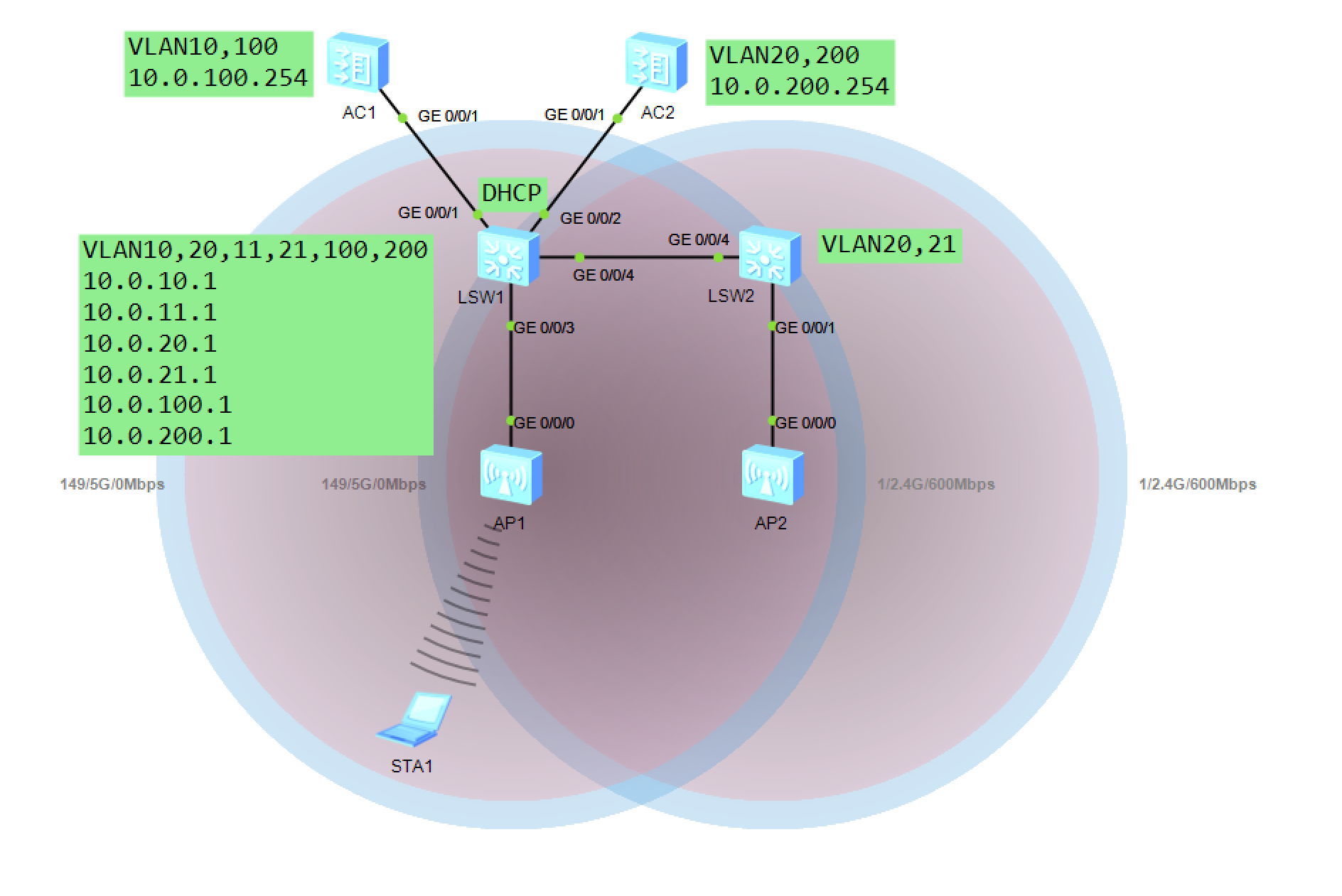
三层漫游
在AC1和AC2上配置
wlan
	mobility-group name mobility
		member ip-address 10.0.100.254
		member ip-address 10.0.200.254
		quit
	quit
现在就完成了三层漫游
贡献者
 lishu620